Data Vault Migration: The DKMS Case Study
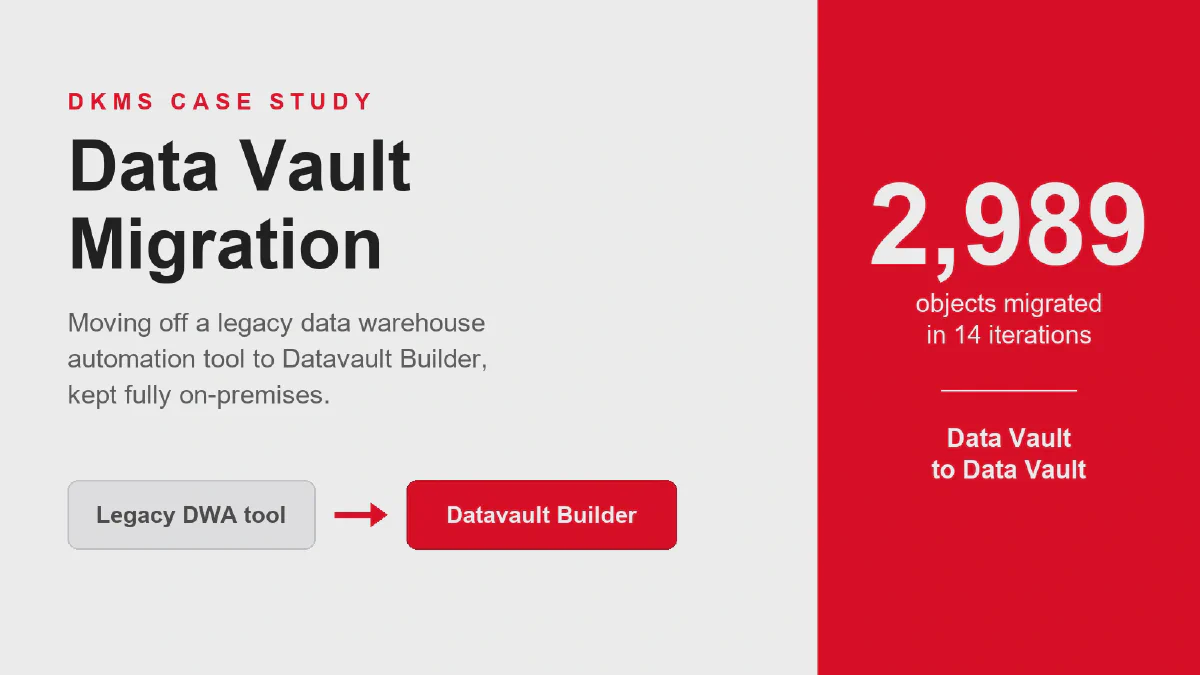
How does a large enterprise migrate its Data Vault to a new automation tool without losing history or re-testing thousands of reports? DKMS and areto share their metadata-driven Migration Vault approach on Exasol on-premises.
DKMS registers blood stem cell donors so that patients with blood cancer can find a matching donor. When your work depends on reaching the right person at the right moment, the data behind it has to be right too. That is the backdrop to this webinar, titled “Beating blood cancer with clean data”, in which DKMS and areto explain how they moved a very large Data Vault to a new data warehouse automation tool.
The session brings together three perspectives: André Kusick, Senior Business Intelligence Engineer at DKMS, who owns the reporting platform; Andre Dörr, Data Engineer at areto, who has worked on the migration project for over a year; and Carsten Schweiger, Data & AI Enabler at Datavault Builder, who co-supervised the metadata migration. You can watch the full recording on YouTube.
What follows is a rare kind of project: a Data Vault migration that moves from one Data Vault to another, one of the more unusual data warehouse automation migrations a data team will run into.
Who is DKMS and why does data quality matter so much?
DKMS is a nonprofit that recruits blood stem cell donors worldwide. Its story began in 1991, when founder Dr. Peter Harf lost his wife Mechtild to leukemia and promised to help every blood cancer patient find a suitable donor. Clean, current donor data is what makes that promise operational.
The numbers the webinar opens with make the mission concrete. Every 27 seconds, someone in the world is diagnosed with blood cancer or a blood disorder, and roughly 10 million people are currently living with one. Yet only about 1% of the eligible worldwide population is registered as a donor. DKMS now counts more than 13 million registered donors across seven countries, and according to the WMDA Report 2024, 35% of all unrelated stem cell donations worldwide originate from DKMS donors. Since 1991 it has enabled more than 135,000 donations, 9,998 of them in 2025 alone, reaching patients in 61 countries.
areto is the implementation partner that has supported DKMS from data strategy through business analysis to implementation. Founded in 2007, with more than 180 employees and over 837 completed projects, it delivered the migration concept behind this project. Datavault Builder is the business-driven data warehouse automation tool at the center of the move, used to integrate data from many sources and prepare it for BI, analytics, and AI workloads.
Why did DKMS need to migrate its data warehouse?
DKMS runs its data warehouse on Exasol on-premises, but its existing automation tool, Wherescape, no longer supported that database. The installed version was outdated with no updates, support was limited, and expertise was scarce on the market. The vendor’s newer product is cloud-only, so an on-premises replacement was required.
Because DKMS handles highly sensitive donor data, its security requirements are high. The data warehouse stays on Exasol on-premises, and that in turn means the data warehouse automation has to run on-premises too. When the incumbent tool could no longer meet that constraint, DKMS ran a software selection. Datavault Builder won, areto produced a migration concept, and after budgeting and approval the project kicked off at areto in Cologne on 13 January 2026.
The scale explains why manual work was never an option. DKMS integrates 11 source systems, including in-house core applications plus Salesforce and SAP, loading more than 400 objects daily in third normal form. The Exasol storage layer holds roughly 4 to 5 TB of data plus 2 TB of indexes, and reporting sits on a star schema in SAP Business Objects with about 4,000 reports. As the DKMS engineer laid it out: every source object typically becomes a hub, a link, and a satellite, which triples the object count to around 1,200, and with four or five processing steps each you quickly pass 5,000 jobs. “That is a volume you can no longer manage manually.”
The mandate was precise: migrate all data and jobs to the new system, and make sure the mart layer, the final layer the reporting depends on, stays result-equivalent to the old system.
What makes a Data Vault to Data Vault migration difficult?
Both the old and new platforms build Data Vault models, yet they implement it differently. As the team put it, both systems speak Data Vault but speak different dialects. Hubs, links, satellites, and the Business Vault are structured differently between the tools, so the migration could not simply copy objects across.
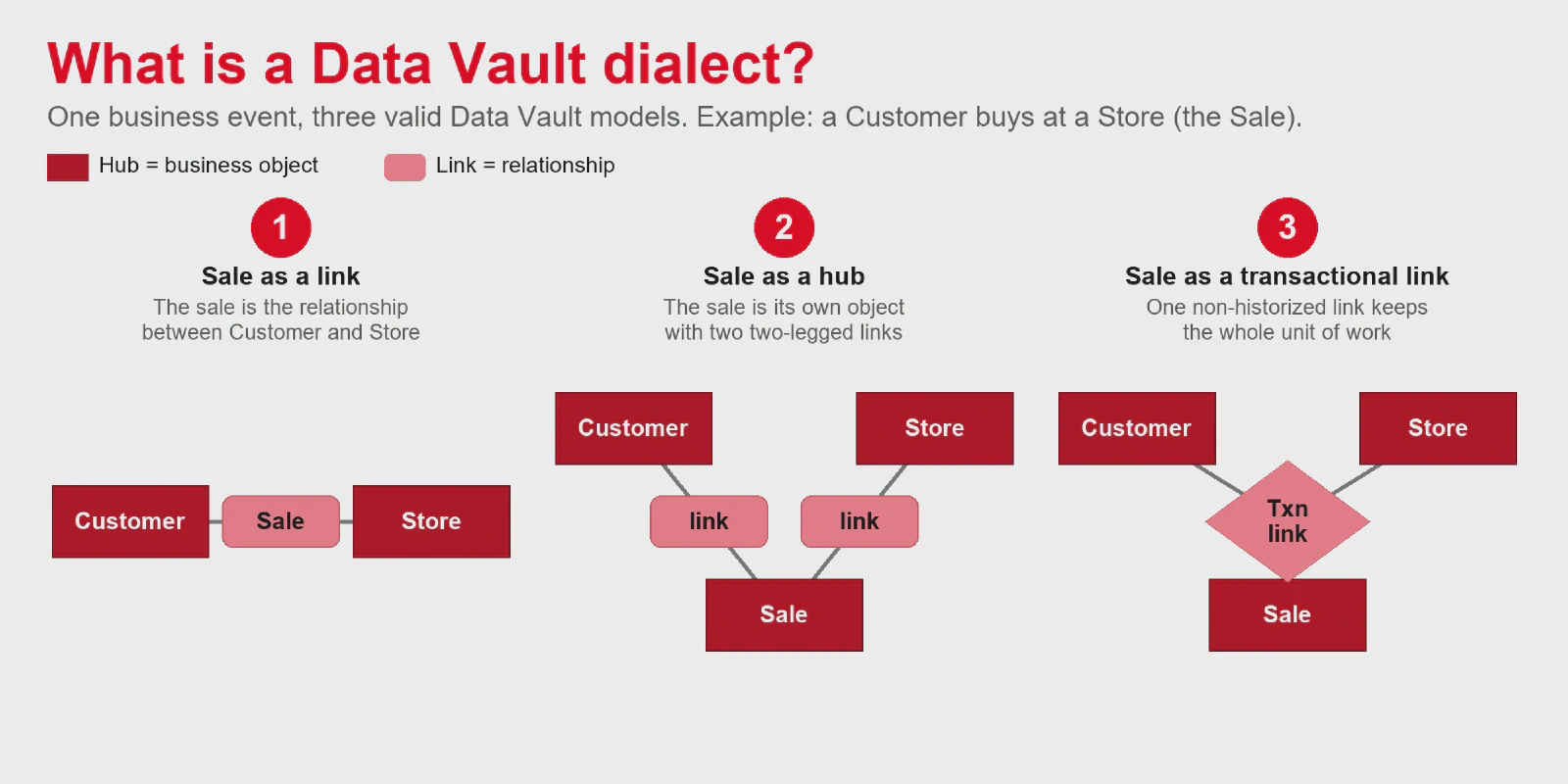
A single business event shows how much room Data Vault modeling leaves. Take a customer who buys something at a store. The sale can be modeled three ways, and all three are Data Vault conform:
- The sale is a link between the customer hub and the store hub.
- The sale has its own natural key, so it becomes a hub with two two-legged links, one to the customer and one to the store.
- The sale is transactional data that never changes afterward, so it becomes a transactional (non-historized) link, a modeling option introduced with Data Vault 2.0.
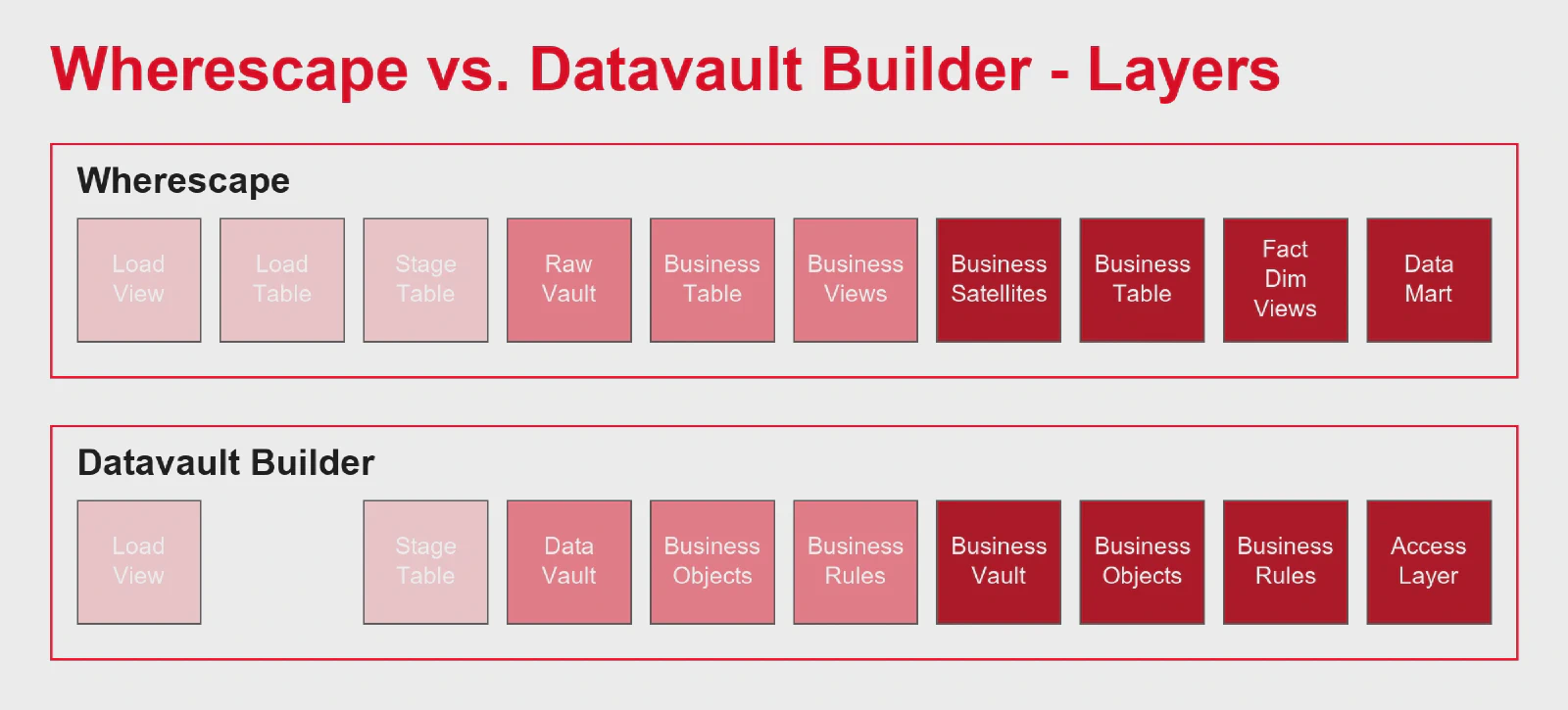
The two tools also differ layer by layer. In the old Wherescape model, the Raw Vault used hubs and SCD2 satellites but stored one link per source table holding all foreign keys, and the Business Vault dropped hubs and links entirely in favor of pure business historization in satellites. Datavault Builder, by contrast, uses hubs, SCD2 satellites, two-legged links for every master-data foreign key, and transaction links with multiple foreign keys that preserve the source system’s unit of work. A useful simplification: in Datavault Builder the Business Vault is identical in structure to the Raw Vault.
How does the Migration Vault automate a Data Vault migration?
The Migration Vault is a metadata store, itself built as a Data Vault, that maps the old model’s metadata onto the structures Datavault Builder needs. The team extracts metadata, maps it onto the meta-model, transforms it into the target structure, and generates a deployment package. In 14 iterations it produced 2,989 production-ready objects.
The starting point was metadata. Wherescape could export the lineage, business keys, foreign keys, attributes, and sources for every hub, satellite, and link, and that gave the team a clean input set to feed the migration. The Migration Vault stores that metadata in a Data Vault about a Data Vault, so the model contains oddities like a hub named “Hub”, a hub named “Link”, and a hub named “Satellite”. As Carsten Schweiger described it, “it takes a bit of rethinking”, but the payoff is a model in which metadata can be stored, versioned, and transformed freely.
The transformation step is where the real value shows up. Different hubs for different countries were consolidated into a single hub, prefixes and postfixes that carried no meaning were stripped, and objects were renamed to match the target model. Each Data Vault core model was built in four steps: create hubs and links, create staging tables, create hub loads and satellites, and create link loads.
The process ran as a loop. Metadata went into the Migration Vault, a deployment package went out to DKMS and areto, they installed and tested it, and manual naming adjustments came back as a new deployment package that fed the next iteration. Roughly 95% of cases were covered by rules, and the remaining handful were handled manually, because writing another rule would take longer than adjusting ten objects by hand. Crucially, those manual adjustments flowed back into the iterations instead of being lost. The result was delivered production-ready, so the Raw Vault could be loaded immediately. A new Datavault Builder GUI, previewed in the webinar for better handling of large models, is planned for Q3 2026.
How do you migrate historical data without losing history?
Datavault Builder supports CDC loads, so a valid-from date can be passed straight from the source. After the automated model migration, the team built views on the old historical satellites and used them as CDC sources. The automated load jobs then pumped all the legacy data into the new Raw Vault, without losing history.
This was the first question from the webinar audience, asked by a team considering the same switch from another tool. The answer is that once the model migration is automated, moving the actual data on top of it is comparatively easy, because the same generated load jobs handle the historical satellites as just another source.
How did DKMS test the migration without re-testing 4,000 reports?
The mart layer, where reporting sits, was safeguarded three ways: profiling, checksum comparison, and direct comparison. Because the new mart layer was proven result-equivalent to the old one, no business department involvement and no re-test of the existing reports were needed. That was the whole point of the mandate.
The testing strategy started by asking a blunt question: what can you actually compare between two structurally different systems? The team mapped the layers of both tools side by side to find comparison points, then applied a different measure at each layer.
Profiling at the edges. For every field of an object, the team collects descriptive statistics, sorting fields into four classes: number, boolean, date, and text. Standard SQL aggregations like count, distinct, min, and max run through views, one script per source, which keeps the solution lean and fast. Profiling runs at the very start on source data and again at the very end on the mart objects, so a mismatch shows exactly where to sharpen.
Jedi tests on the Raw Vault. The name comes from a rephrasing of a familiar line: “May the source data be with you.” The idea is a Lego analogy. Loading a source object into the Raw Vault is like taking a Lego car apart and sorting the pieces. The test proves you can rebuild exactly the object you drove in. It is a straightforward test on equality between the source in third normal form and the Raw Vault.
Checksum comparison on the mart. To compare whole tables quickly, the team takes an MD5 hash over all columns, strips the letters to leave a decimal number, forms its digit sum, and then sums those across the table into a single check number. A huge value like 99875456758403899029 collapses to 117, which is trivial to compare.
Direct comparison. The two systems are coupled over a database link, and standard SQL MINUS operators compare them in both directions. The comparison workflows were built in an analytics platform that connects to different systems, pulls data, and compares it. Together these measures confirm that the new system returns exactly what the old one did.
What did DKMS and areto learn?
The metadata-driven approach and the iterative Migration Vault saved significant time. Data Vault standardization helped throughout, manual adjustments fed back into each iteration instead of being lost, and the testing measures doubled as quality assurance for ongoing production operation, not just one-time migration checks.
A Data Vault to Data Vault migration is admittedly an unusual scenario. Most teams do not migrate from one Data Vault to another. But the standardized structure of Data Vault is exactly what makes it tractable, because the metadata is regular enough to automate against. For the application owner, the lasting benefit is that the quality measures built for the migration stay useful afterward: load profiling has been in use for years to catch a source that stops delivering or suddenly delivers new value patterns, and the Jedi tests remain quality assurance for day-to-day operation.
Frequently asked questions
- A Data Vault migration moves an existing Data Vault model, its data, and its load jobs to a new platform. In the DKMS case it was a Data Vault to Data Vault move from Wherescape to Datavault Builder, with a hard requirement that the mart layer feeding reporting stay result-equivalent to the old system.
- DKMS keeps sensitive donor data on Exasol on-premises, and its old automation tool no longer supported that database. The version was outdated with no updates, support was limited, and expertise was hard to find. The vendor’s replacement product was cloud-only, so DKMS needed a new on-premises tool.
- The project kicked off at areto in Cologne on 13 January 2026. Work ran in bursts of several versions per week with pauses in between, the first version was roughly complete in March, and the final version was delivered on 9 April 2026. In total the migration took about two and a half months across 14 iterations.
- Datavault Builder supports CDC loads, which let you pass a valid-from date directly from the source. After the automated model migration, the team built views on the old historical satellites and used them as CDC sources, so the automated load jobs moved all legacy data into the new Raw Vault with its history intact.
- No. The mart layer was safeguarded with profiling, checksum comparison, and direct comparison, and proven result-equivalent to the old system. Because of that, the migration required no involvement from the business department and no re-test of the roughly 4,000 existing reports.
- The Migration Vault is a specialized metadata store, itself designed as a Data Vault, that automates migrating existing structures to Datavault Builder. It stores the old model’s metadata, lets you transform and version it, and generates a deployment package that installs the new model on the target platform.
See Datavault Builder in action
20-minute demo. Honest answers on whether it fits your team.
Book a Free Demo