Datavault Builder and the DAMA-DMBOK Framework — How We Support the Eleven Knowledge Areas
A walk through the eleven DAMA-DMBOK domains and how Datavault Builder supports each one — built specifically to make data warehousing, integration and modeling easier.
A personal perspective from Petr Beles, CEO and co-founder of Datavault Builder.
The two questions I get asked most often are: “What does Datavault Builder actually solve?” and “Why is it a more complete solution than stitching together a handful of separate tools?”
They usually come from a Head of BICC or a chief data architect who is staring at a stack diagram with a modeling tool, an ELT tool, an orchestrator, a lineage tool, a quality tool and a documentation portal — sometimes up to nine different vendors, contracts and upgrade paths — and asking whether there is a saner way to deliver a data warehouse.
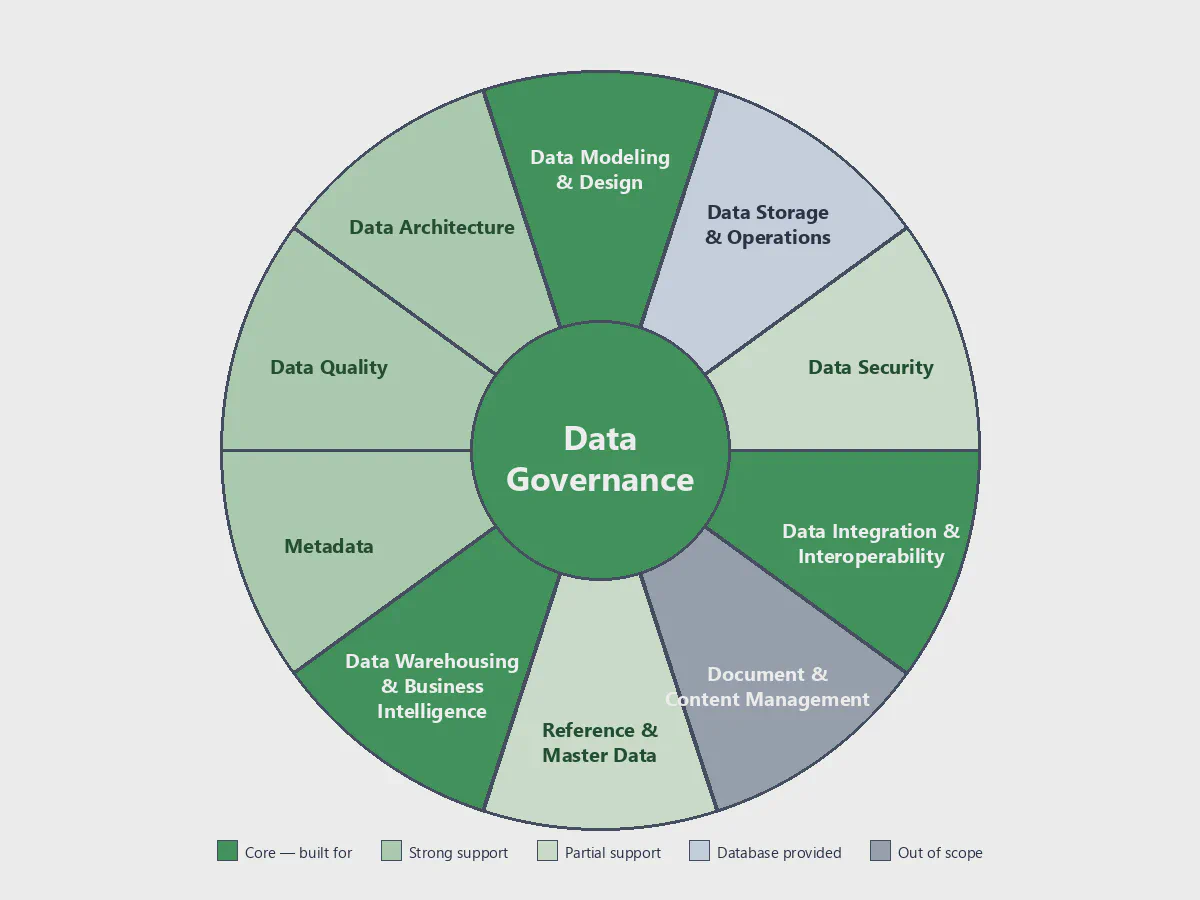
The DAMA-DMBOK wheel is a great method to show that value, because it lays out the eleven knowledge areas of data management on a single page. Once you map a tool stack onto the wheel, it becomes very visible which areas are covered by one product, which by another, and where the seams are. So I want to walk through the wheel area by area and show what Datavault Builder is doing in each one.
Before I do that, one thing matters more than the rest of this article:
One distinction is worth making up front. DAMA-DMBOK is a data management framework — a description of disciplines, most of which are ultimately people-and-process work. Datavault Builder is a technology platform that supports specific parts of that framework. Several areas on the wheel — Data Governance, ownership and stewardship in particular — remain organizational disciplines that no tool can own on your behalf; what a platform can do is remove the technical friction that makes them hard to sustain. Keeping that line clear is what makes the rest of this walk-through honest rather than a feature pitch.
Several of these knowledge areas are not “features” of Datavault Builder. They are the reason the company exists. Data Modeling, Data Integration, and Data Warehousing & BI are the domains we built the platform around. Our entire mission is to make life easier in those three areas — to take work that used to be slow, manual and error-prone, and turn it into something that is automated, traceable and fast. The reason the platform feels more complete than a stack of separate tools is that those three core areas, plus Governance, Architecture and Metadata, share one model and one source of truth instead of being held together by integrations between six different products. Everywhere else on the wheel, we either contribute to the discipline or sit cleanly next to the tools that specialize in it.
With that in mind, here is a walk through the eleven areas.
DAMA-DMBOK describes organizational data management capabilities, not software products. The positioning in this article shows where Datavault Builder provides technical support for those capabilities — it does not imply that a technology platform replaces governance, stewardship, organizational roles or business processes.
| Knowledge area | Main challenge | How Datavault Builder helps |
|---|---|---|
| 1. Data Governance | Governance stalls when treated as a separately funded workstream. | • Governance-enabling capabilities built into delivery • Standardized metadata layer • No separate funding |
| 2. Data Architecture | Bespoke architectures multiply maintenance cost and slow delivery. | • Standardized patterns • No point-to-point pipelines • Auto-generated docs |
| 3. Data Modeling & Design | Business and technical models drift apart over time. | • Visual business model • Single source of truth • Versioned changes |
| 4. Metadata Management | Parallel metadata catalogues drift from the deployed code. | • Captured once • Auto column-level lineage • Audit evidence on demand |
| 5. Data Integration & Interoperability | Each new source becomes a bespoke engineering project. | • Code generated from model • Idempotent, restartable loads • Platform-portable |
| 6. Data Warehousing & BI | Inconsistent data undermines trust in BI and AI results. | • Cleansed and integrated • History preserved • Same base for BI + AI |
| 7. Data Security | Buyers expect certified controls plus integration with existing IAM and SIEM. | • ISO 27001:2022 + SOC 2 Type 2 • SSO via Entra, Okta, Keycloak, AD • Sovereign / on-prem deploy |
| 8. Data Quality | Silent corrections drop facts and hide root causes from stewards. | • Raw vault preserves all • Failed rows routed to stewards • Quality KPIs on the model |
| 9. Master & Reference Data | Manually mastered records age into stale snapshots of reality. | • Hubs + same-as links • Continuous reconciliation • Full change history |
| 10. Data Storage & Operations | Reinventing storage, scaling and backup duplicates the database platform. | • Runs on your DB • Orchestrates loads + releases • No parallel ops layer |
1. Data Governance
Governance is first and foremost a people-and-process discipline — it lives in ownership, decision rights, policies and stewardship, and those have to be set by the organization, not by a tool. Datavault Builder does not replace that work. What it does is take the parts of governance that can be automated and make them the path of least resistance, so the human side has a solid technical foundation to stand on rather than a pile of undocumented pipelines to fight against.
With that boundary drawn, the most important thing about how Datavault Builder supports governance is that its governance-enabling capabilities are embedded directly into the delivery process — they are not something you add on the side, at extra cost, after the warehouse is already built. That single difference is, in my experience, why so many governance initiatives quietly stall. When governance is treated as a separate workstream, individual data consumers see it as a cost without an obvious business value attached to their own use case, and it gets deprioritized.
By making governance-enabling practices the default way of working — naming conventions, raw vault patterns, business vault rules and load logic standardized in the metadata layer; definitions, owners and rules captured next to the model they apply to — it is no longer something anyone has to fight for or fund separately. It is just how every project is delivered, which means it cannot drift apart from the implementation and does not need a business case of its own.
2. Data Architecture
By building on established standards, Datavault Builder provides a complete architecture for data integration — covering harmonization, cleansing, history, lineage and consumption layers — out of the box. The architecture is well proven across many production deployments, so you can start delivering immediately, without architectural delays. Through automation it removes most of the cost that used to come with hand-built warehouses, and the patterns we apply are the patterns we have validated over years of real-world projects, which takes the architectural risk off the table.
A few things that used to be major effort items simply disappear with this approach:
- No bespoke interfaces between applications to define, build and maintain. The platform handles how each source system connects, lands and integrates — there is no parallel landscape of point-to-point pipelines to keep alive.
- No custom documentation to write and keep in sync. Documentation is generated from the model itself, so it is always current and consistent across projects. The “documentation debt” that accumulates in hand-built warehouses simply does not arise.
- Training new team members becomes much faster and cheaper. Because every project follows the same standardized architecture and patterns, a developer who has learned one Datavault Builder project can contribute to any of them — instead of having to learn a different bespoke design every time.
A core architectural choice underneath all of this is the separation of concerns between a historized core (the raw and business vaults) and a flexible, virtualizable presentation layer. The core preserves every fact; the presentation layer is rebuilt or extended without ever rewriting history. That split is what makes the architecture resilient to future change — new reports, new BI tools, new compliance demands — without re-running multi-month projects.
3. Data Modeling & Design
This is one of the three areas the platform is built around. The centerpiece is a business data model — designed visually, expressed in terms business people actually use (customers, products, contracts, transactions) rather than table and column names. That model is the bridge between data engineers and business users: engineers can implement against it because it is precise and unambiguous, and business users can read and validate it without reading SQL. The conversation between the two sides finally happens on the same artifact, which is where most data projects either succeed or quietly drift apart.
The same model is also the single source of truth for what gets deployed — no parallel “logical model” and “physical code” to keep in sync by hand. Model changes are versioned and traceable to a business reason, so when the business asks “why does the warehouse work this way?”, the answer is in the model. This is a model-first approach: business intent shapes the architecture, not the other way around.
4. Metadata Management
The principle here is simple: metadata is captured and updated exactly once. When something changes in the model — a new attribute, a renamed source, an updated business rule — the change is reflected everywhere it matters: in the deployed code, in the lineage graph, in the documentation, and in the audit trail. There is no parallel metadata catalog to update by hand and no risk of the model and the documentation telling different stories. Datavault Builder acts as an active metadata repository: technical and operational metadata (load dates, run history, applied rules) are captured automatically as the warehouse runs, not maintained by hand on the side.
The model also supports business glossary integration out of the box: technical hubs, links and satellites can be mapped to the business terms a glossary defines — customer, contract, product — so the business data architecture and the physical data architecture stay aligned by construction.
End-to-end column-level lineage is available from source system to consumed mart, generated automatically rather than drawn manually. “Where did this number come from?” is a question with a fast answer rather than an investigation.
Because all of this metadata lives in one consistent layer, regulatory reporting becomes a query rather than a project. GDPR, BCBS 239, HIPAA, SOX, AI Act and similar frameworks all require evidence of how data flows, where personal data resides, who has access and how it is processed. With Datavault Builder, that evidence is accessible through simple interfaces — no special audit-mode export, no last-minute scramble to reconstruct lineage from a stack of pipelines.
5. Data Integration & Interoperability
This is the second of the three core areas. Integration code — loads, transformations, history handling — is generated from the model rather than hand-coded per source. Loads are idempotent and restartable, which gives you immutable history: data can be reloaded after a fix without creating duplicates or inconsistencies, and the audit trail of what was loaded when stays intact. Onboarding a new source becomes a modeling task, not a bespoke engineering project.
The integration layer is portable across underlying platforms (Snowflake, Databricks, BigQuery, SQL Server, Microsoft Fabric, Oracle, Exasol, PostgreSQL), and Datavault Builder runs equally well in the cloud and on-premises. That portability matters for two reasons. It reduces cloud platform lock-in — you can move workloads between platforms or run a hybrid setup without rewriting the warehouse. And it gives you full data sovereignty at any point in time: if regulation, customer demand or geopolitics change tomorrow, you can keep sensitive data in a specific country, in your own data center, or in a sovereign cloud, without rebuilding what you have already delivered.
6. Data Warehousing & BI
This is the third core area, and the important thing here is what kind of data the platform delivers. We do not just move raw data from one place to another. We deliver cleansed, integrated, and contextualized data — harmonized across source systems, with business keys reconciled, history preserved, and definitions attached. That makes the same warehouse useful for two very different consumers: classic analytics tools (Power BI, Tableau, Qlik, Looker, MicroStrategy, BusinessObjects) reading from consistent, certified marts; and AI and machine-learning workloads, which need exactly that kind of trustworthy, well-described training data to produce reliable results. Historical state is preserved natively, so point-in-time questions — “what did we know on date X?” — are part of how the warehouse is built, not a project on the side. Releases are automated end-to-end.
Underneath this is a deliberate ordering: the platform loads detail first and summarizes last. Source records are kept in the raw vault at their original grain with full history; aggregates, business rules and marts are derived from that complete factual base. The advantage is that any new question can be answered against the full detail, and any prior aggregate can be re-derived if the rule changes — without re-ingesting the source systems.
7. Data Security
Datavault Builder is ISO 27001:2022 certified and SOC 2 Type 2 compliant, so the platform itself meets the security and operational controls a regulated buyer expects to see before any contract is signed. On top of that, it provides the technical foundations a security team needs to certify a data environment: layered access by role and by sensitivity, end-to-end audit logging of data movement and access, and deployments that respect data residency and sovereignty constraints (Swiss and EU-hosted options, sovereign cloud, or fully on-premises).
Authentication integrates with the identity providers you already run — Microsoft Entra ID (formerly Azure AD), Okta, Keycloak, Active Directory, and any SAML 2.0 or OIDC-compatible provider — so users keep their existing single sign-on, MFA and group policies. The platform works alongside your IAM, key management and SIEM rather than replacing them.
These capabilities are the technical foundation for — not a replacement of — your broader data security program: security governance, data classification, privacy, policies and risk management remain organizational disciplines that the platform supports with certified, auditable controls.
8. Data Quality
Datavault Builder takes a deliberate approach to data quality. We first create a single source of facts — the raw vault preserves every record we receive from the source systems, exactly as it arrived, with full history. Nothing is dropped, nothing is silently corrected. This is what the Data Vault community calls passive data quality: the architecture itself protects the factual record before any rule is applied. From that complete factual record, the platform applies your business and quality rules to decide what is fit for downstream use.
The result is a two-track flow: data that meets the rules is published to reports, marts and AI workloads; data that fails the rules is routed to the role responsible for it — typically a data steward — with the rule it failed, the source record, and the context needed to fix it. Nothing disappears, nothing blocks delivery of the good data, and the people who can actually correct an issue are the ones who see it. Routing failed rows back to the steward who owns the source is also what makes the platform a tool for addressing root causes rather than patching symptoms downstream.
Quality KPIs (completeness, accuracy, timeliness, consistency) are measured and trended on the same model that carries the data, so quality is part of the warehouse rather than a parallel system. Data quality as DAMA defines it is a broader discipline than any warehouse platform covers — it also spans profiling, monitoring, issue management, measurement, root-cause analysis, prevention and continuous improvement. Datavault Builder addresses an important subset of that discipline, and integrates with dedicated data quality solutions where broader governance or monitoring capabilities are required.
9. Master & Reference Data
Datavault Builder is not a master data management system, and we do not claim to be one. What we do offer is something a lot of organizations underestimate: integrated views on central entities. Hubs, business keys and same-as links are native concepts in Data Vault, which is exactly the modeling discipline needed to identify the same customer, product, employee or account across many source systems and bring those views together.
In practice, many organizations find that these continuously reconciled integrated views satisfy a significant proportion of their master data requirements. A manually curated record is a snapshot at a moment in time and tends to fall behind reality; the integrated view from Datavault Builder is reconciled continuously from the actual source systems, with a full history of every change preserved. Every shift over time — a customer’s address change, a product reclassification, a contract amendment — is transparent and traceable, with the date, the source and the prior state still available.
Reference data sets — country codes, currencies, lookups — are version-controlled and shared across the warehouse. Where stewardship workflows, survivorship rules, golden-record management or dedicated master data governance are required, a dedicated MDM solution remains the right tool — and Datavault Builder works alongside it. In many cases, though, customers find the integrated view is enough on its own.
10. Data Storage & Operations
For storage we rely on the database system you already run. Datavault Builder supports:
- Snowflake
- Databricks
- Google BigQuery
- Microsoft SQL Server
- Microsoft Azure SQL
- Microsoft Azure Synapse
- Microsoft Fabric
- Oracle
- Exasol
- PostgreSQL
Datavault Builder orchestrates loads, generates the deployed objects and manages releases on top of whichever of these you choose. Operational concerns like storage, performance, scaling, backup, capacity and disaster recovery are solved perfectly by these platforms — that is what they are built for, and there is no reason for us to duplicate them.
11. Document & Content Management
We do not cover this area. Document and content management — contracts, emails, images, scanned files — belongs in dedicated content systems. What our platform does provide is the integrated data and metadata those systems need to work well: consistent business keys, governed reference data, lineage and definitions that a content system can attach its documents to, so a contract or invoice PDF can be reliably linked to the right customer, product or transaction in the warehouse.
Where the discipline is heading
One closing note on where data management itself is going. The themes emerging for the next revision of DMBOK — data products, active metadata, AI governance, a stronger emphasis on business ownership — all rest on the same foundations described above: trusted metadata, automated lineage and a business-readable model. Organizations that have those foundations in place will find the emerging practices an extension of what they already do, not another program to fund.
Want to see where you stand?
The most useful conversation I have with new customers starts with the same question reversed: where is the work today, and where would you most like life to get easier?
We have put together a short DAMA-DMBOK self-assessment — three quick questions per category, rated 1–5, that produces a per-area score and a spider diagram of your result side-by-side with a typical Datavault Builder customer. It also asks which tools you currently use in each category, so you can see how many separate tools your team is maintaining today. Most teams are surprised by that number.
See Datavault Builder in action
20-minute demo. Honest answers on whether it fits your team.
Book a Free Demo